
How to Identify AI Mistakes
AI-generated videos can look very realistic, but sometimes AI may change details you didn’t ask it to change.
Before saving, compare the AI video with the original photo and look for anything inaccurate.
Pay extra attention to:
Text
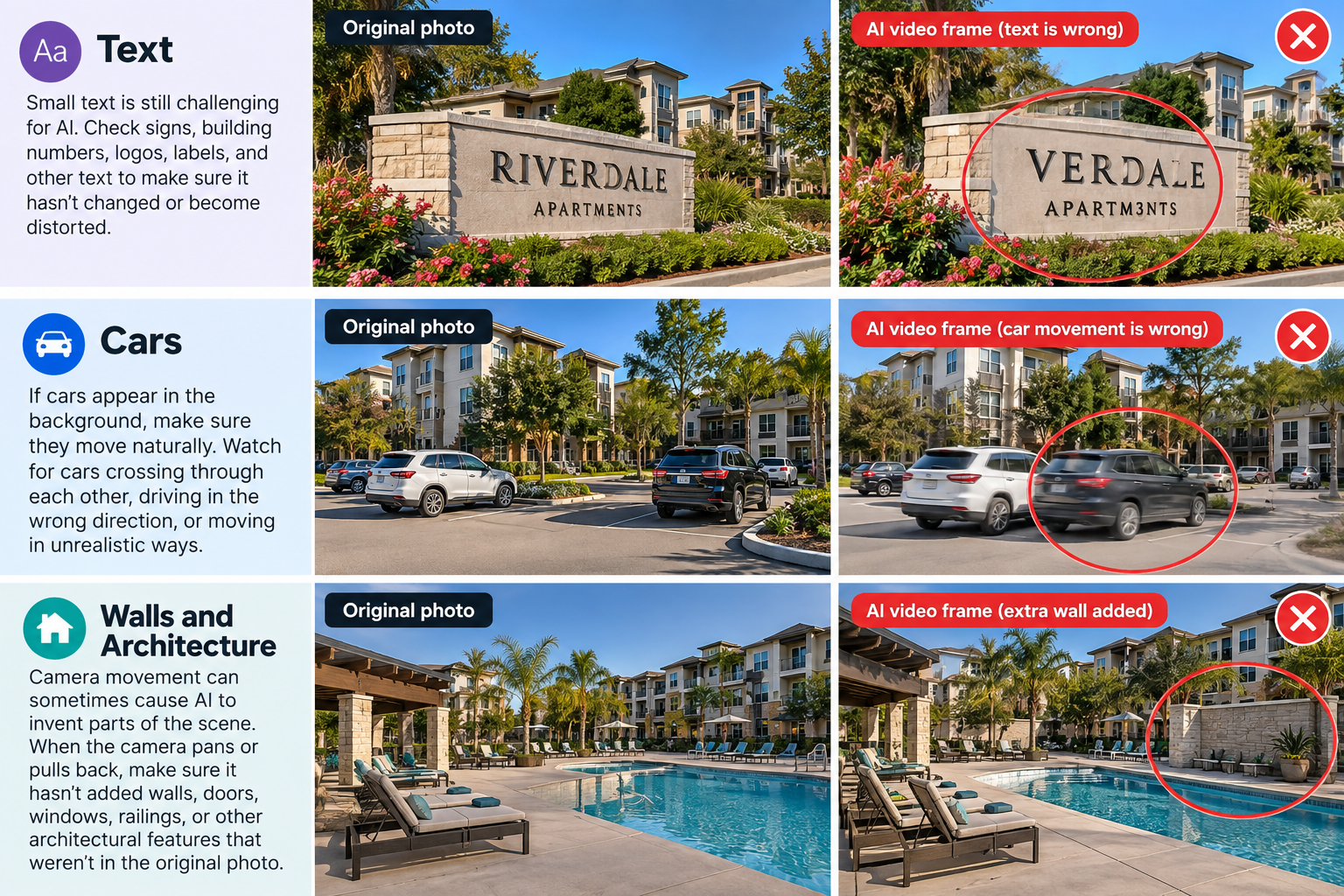
Small text is still challenging for AI. Check signs, building numbers, logos, labels, and other text to make sure it hasn’t changed or become distorted.
Cars
If cars appear in the background, make sure they move naturally. Watch for cars crossing through each other, driving in the wrong direction, or moving in unrealistic ways.
Walls and Architecture
Camera movement can sometimes cause AI to invent parts of the scene. When the camera pans or pulls back, make sure it hasn’t added walls, doors, windows, railings, or other architectural features that weren’t in the original photo.
The simple rule
If you didn’t ask AI to change it, it shouldn’t change.
Always compare the AI video with the original photo before saving or publishing it.